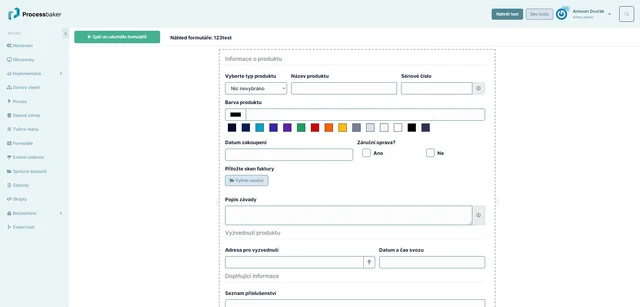
Forms are components for entering data into the system. If you need to obtain data from users, prepare a clear, fine-tuned form for them. Systembaker offers a wide range of tools for form creation according to your needs.
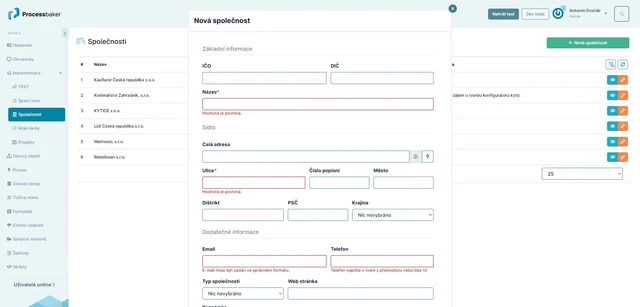
Tool for creating user-defined forms. After creation, the form can be displayed in the desired location within the system.
Easily Define What Data Users Will Enter into the System
- Form creation is done through the form designer interface in an intuitive way using drag and drop, i.e., by dragging the selected form input into the form.
- Next, the user performs the necessary behavior and appearance settings for the element and saves the form. Changes take effect immediately after saving, so changes can be made directly on-the-fly in the system.
- Elements can be freely moved across the screen to create the desired form layout; the user can define the number of columns and rows according to their needs.
- The created form can then be displayed to users, e.g., on the screen or will appear when clicking a button in a modal window, etc.
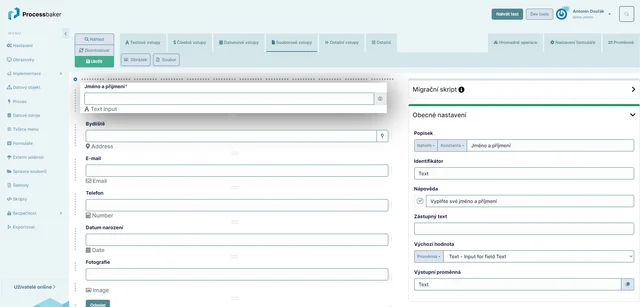
Users can choose from a variety of inputs for forms, such as:
- Text Inputs - such as text field (several different types including WYSIWYG editor), address, color, email, password, URL;
- Numeric Inputs - such as price, range, number;
- Date and Time;
- File Inputs - for user file uploads;
- Other Elements - such as selection from options (dropdowns), switches, checkboxes, buttons.
- Bulk Operations - elements for performing bulk operations with data;
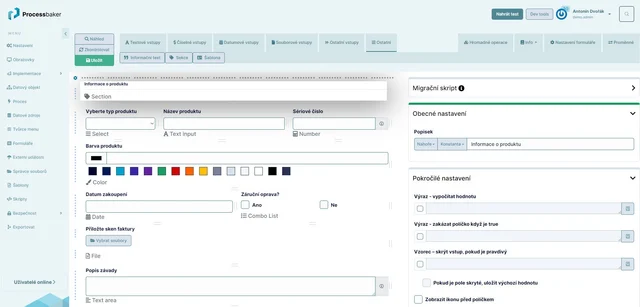
Wide Customization Options for Forms
Each form input allows a range of appearance and behavior settings, such as:
- Tooltip for a specific element, which will be displayed to the user when hovering over the help icon.
- Validators - for individual elements, you can choose from various types of validators, so the system will monitor, for example, the length of the entered text, range of entered values, whether the input is mandatory, or if a unique value is required (e.g., when creating a user, the system will check that a user with the same email does not already exist, and if so, saving the form will not be allowed).
- Advanced settings that allow, for example, to calculate a value using expressions. If the expression is true, it is possible to hide or disable the element.
- For individual form elements, you can define variables.
- Appearance settings for the element - it is possible to set the text and background color of the element directly in the form; further adjustments to the color scheme of the forms can be made in the system's appearance customization module.
- Systembaker can create forms with a data object, or save form data to variables during the process.