Processes - the Heart of Your System

Every company undergoes a series of unique processes. Systembaker allows you to create a custom system precisely tailored to these unique processes. So, you don't have to adapt your processes to ready-made (and often only partially suitable) solutions; you can build a system directly based on your needs.

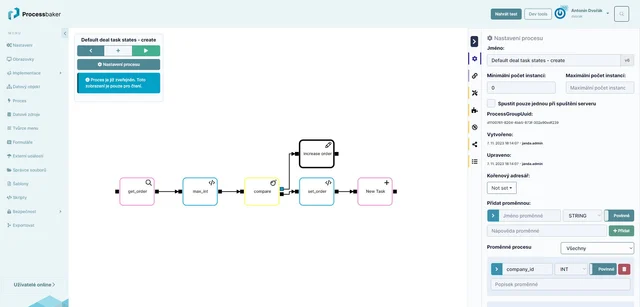
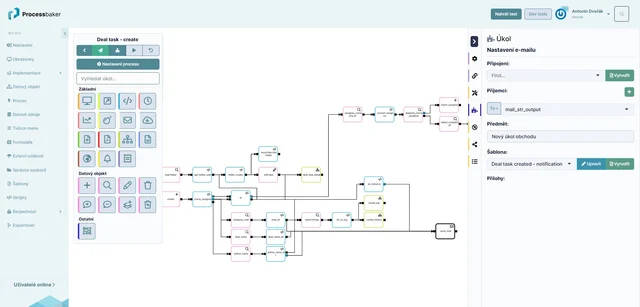
Setting up processes is done using intuitive wizards without the need for programming. The interface is easy to use, and assembling processes is done through drag and drop.

If additional functionality needs to be programmed, it can be done using JavaScript scripts.
  • Users create the logic of specific functionality using processes.
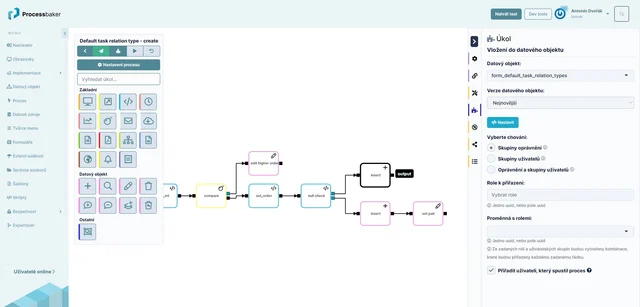
  • There are various types of steps available; the user simply arranges a sequence of individual steps, functions, and calculations that should occur by dragging and dropping the chosen steps. For example, displaying a screen, form, sending an email, generating a document, making data changes (add, delete, or edit a record), etc.
  • Each step of the process can be configured in detail.
function processes
  • The order of individual steps can be easily changed by dragging with the mouse. It is possible to add another existing process as a subprocess to keep more complex processes clearer.
  • Systembaker also includes built-in functionality for control, testing, and debugging processes with the option to trace the process flow.
  • After fine-tuning the process, the user publishes it, and the published process can then be used in the system. Versioning of processes is a matter of course.
  • Working with processes in Systembaker also includes a unique system of variable management based on a wizard. Variables allow data to be passed within and outside the process.

Within processes, you can use various types of steps, such as:

  • Show Screen - displays a defined screen.
  • Data Record Operations (create data records, select, edit, delete, add rights).
  • Document - allows the generation of documents in various formats based on a template.
  • Email Sending - sets up automatic email sending by the system.
  • Notifications - displays a system notification to the user; content and appearance of the notification can be defined, as well as when and to whom it will be displayed.
  • Rest API - allows integration of the system with external systems or mobile applications.
  • User Script - the user can enter the desired functionality of the step in JavaScript.
  • Timer - allows defining rules based on which a task will be scheduled.
function processes